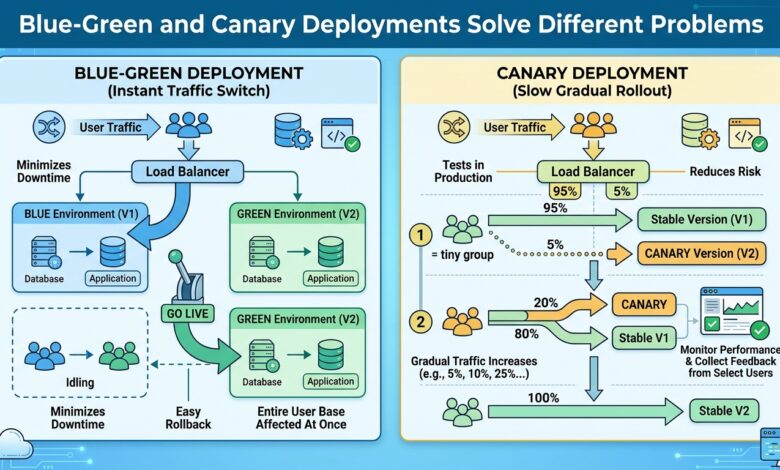
Key takeaway: Blue-green gives you a fast undo for problems you detect immediately. Canary gives you early detection for problems that only appear under real traffic. They are complements, not alternatives.
What Each Actually Guarantees
Blue-green runs two complete environments. Traffic points at blue; you deploy to green, verify it, then switch the router. If something breaks you switch back, and the rollback takes as long as a DNS or load balancer update.
Canary runs one environment with two versions side by side. You send one percent of traffic to the new version, watch error rates and latency, then progressively raise the share.
The distinction is what each protects against. Blue-green protects against deploy-time failure — a bad build, a broken configuration, a failed migration. Canary protects against runtime failure that only surfaces with real traffic patterns, real data shapes and real concurrency.
Comparing the Trade-Offs
| Dimension | Blue-green | Canary |
|---|---|---|
| Rollback speed | Seconds | Minutes (drain traffic) |
| Infrastructure cost | 2× during deploy | ~1.05× |
| Users exposed to a bug | All, until detected | Small percentage |
| Detects load-dependent bugs | No | Yes |
| Database migration complexity | High | High |
| Routing sophistication needed | Low | Moderate to high |
Blue-green’s weakness is that when you flip the switch, one hundred percent of users meet the new version simultaneously. A bug that only appears at scale is discovered by everyone at once. The rollback is fast, but the exposure was total.
Canary’s weakness is duration. Running a meaningful canary takes long enough to accumulate statistically useful error data — typically fifteen to sixty minutes per stage — and requires both versions to coexist against one database.
The Constraint Both Share
Neither strategy makes schema changes safe. Both run old and new code against the same database, which means every migration must be backward compatible for at least one release. The expand-migrate-contract sequence is unavoidable:
- Add the new column as nullable; deploy code that writes both old and new
- Backfill existing rows
- Deploy code reading the new column
- Only then drop the old column, a release later
Teams that adopt either strategy while treating migrations as atomic discover that rollback is impossible in exactly the scenario where they need it most, because the old code cannot read the new schema.
Choosing In Practice
Use blue-green when deploys are infrequent, the environment is cheap to duplicate, and the main risk is configuration or build failure. Use canary when traffic is high enough for one percent to be statistically meaningful, and when the main risk is behaviour under real load.
Mature setups combine them: deploy to a green environment, canary a slice of production traffic into it, then complete the cutover once metrics hold. That yields early detection and instant rollback, at the cost of running duplicate capacity and sophisticated routing.
The Bottom Line
Pick based on which failure mode actually bites you. If incidents come from bad builds, blue-green is enough. If they come from behaviour you only see at scale, canary is the one that would have caught them — and no deployment strategy compensates for a migration that cannot roll back.